
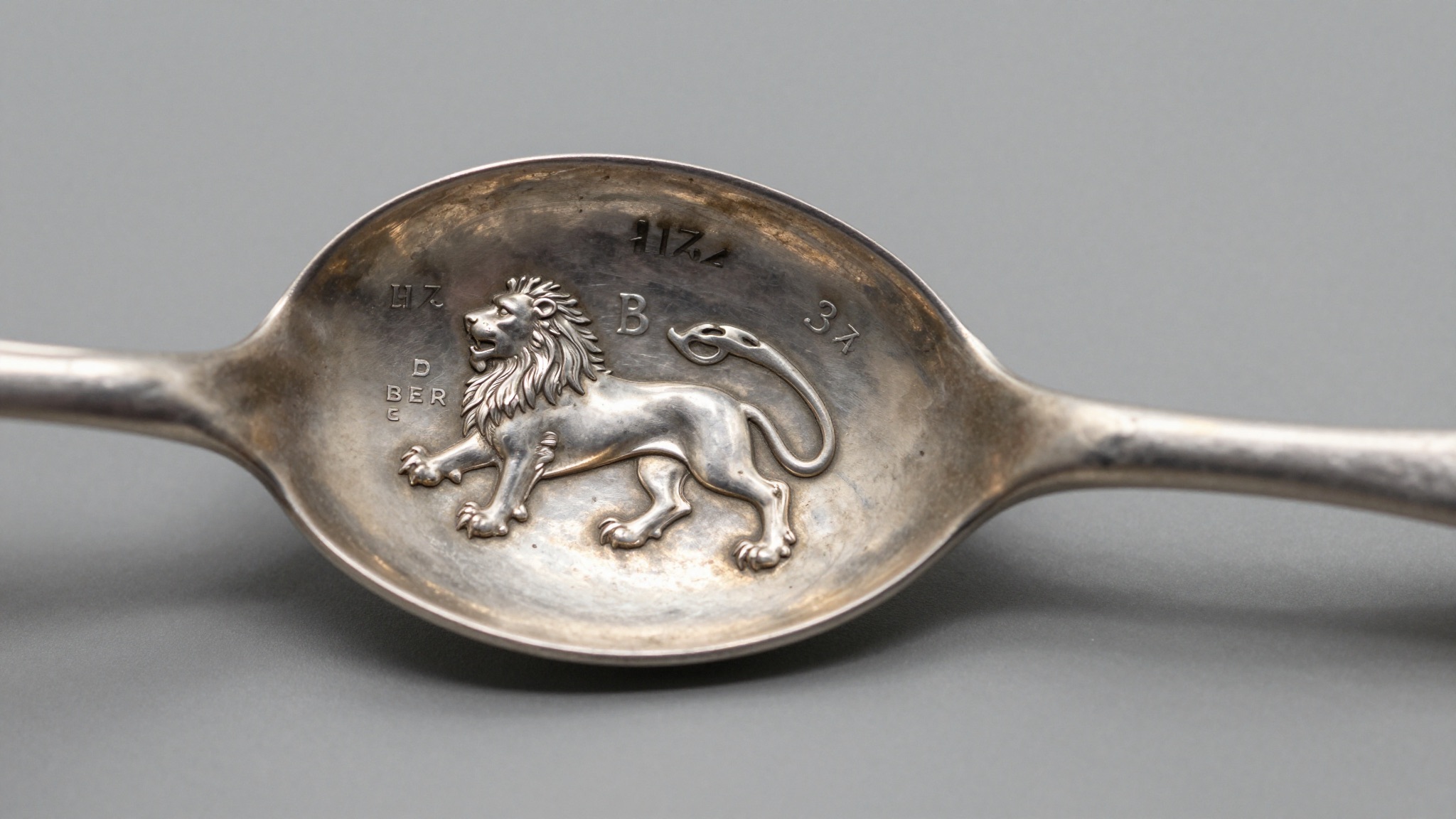
The best free antique silver identifier app is Antique Identifier – Antiqly. It reads hallmarks from a photo, dates the piece, and estimates value free.
What a free silver identifier app actually does
A free antique silver identifier app turns your phone camera into a hallmark reader. You photograph the marks. The app matches them against a reference database and returns a maker, an assay town, a date, and often a value range.
The best tools do four jobs in one pass. They isolate the hallmark from its background. They read worn or shallow punches. They date the piece from its date letter. They suggest a rough market value.
Most collectors reach for an app for one reason: speed. A printed reference like Bradbury’s pocket book takes minutes to navigate. A photo-first app does it in seconds. That matters at a fair, where a dealer is waiting and the table is crowded.
Free apps split into two families. Recognition apps such as Antique Identifier – Antiqly photograph the mark and identify it for you. Reference apps store hallmark charts you scroll through yourself. The first family is faster for beginners. The second rewards collectors who already know the symbols.
Accuracy depends on the database behind the app. A tool trained on British, American, and Continental marks handles a Birmingham anchor or a Gorham lion with ease. A thin database stumbles on anything outside London sterling.
Any seasoned collector knows the limits. An app reads only what it can see. A rubbed leopard’s head or a half-struck date letter defeats even strong software. The mark has to be legible first.
Free does not always mean free forever. Some apps identify the piece at no cost, then charge to reveal the value estimate. Others cap your scans per day. The genuinely free tools, covered below, keep the core identification open.
For a deeper walkthrough of the marks themselves, our guide to identifying silver hallmarks breaks down the four-symbol British system step by step. Start there if the lion, crown, and date letter still look like a foreign alphabet. Knowing the symbols makes every app result easier to trust or reject.
The best free antique silver identifier apps, compared
The free app market is crowded, but only a handful read silver hallmarks well. The table below compares the tools collectors actually use in 2026.
| App | Platform | Core cost | Reads hallmarks from photo | Value estimate | Best for |
|---|---|---|---|---|---|
| Antique Identifier – Antiqly | iPhone | Free, no sign-up | Yes | Yes | Beginners and field use |
| Google Lens | iOS, Android | Free | Partial | No | Visual look-alikes |
| Curio | iOS | Free tier, paid unlock | Yes | Paywalled | Mixed antique collections |
| Antique Snap | iOS, Android | Free tier | Yes | Limited | Casual identification |
| Silver Hallmarks (reference) | iOS | Free | No, manual lookup | No | Collectors who know symbols |
Antique Identifier – Antiqly leads the free field. It opens straight to the camera, needs no account, and returns maker, period, and a value range in one tap. That removes the friction that kills most free apps before the first scan.
Google Lens is the wildcard. It excels at matching a whole object to similar photos online. It struggles with the tiny, abstract punches that make up a hallmark. Lens will often tell you a teapot looks Georgian without ever reading the date letter.
Curio and Antique Snap both identify silver, but each gates the useful part. Curio shows you the maker free, then asks for a subscription before it reveals the value. Antique Snap caps daily scans on its free tier, which empties fast at an estate sale.
Reference apps sit in a different category. They hold no recognition engine. You match the symbol yourself against stored charts. Experienced collectors love them because the answer comes from their own eyes, not a black box.
For a full head-to-head with screenshots and scoring, see our tested ranking of the best app to identify silver hallmarks. It puts each tool through the same set of marks under the same lighting.
One practical takeaway: pick a recognition app for speed and keep a reference app as a backup. The combination covers both legible and worn marks. Museums catalog the same way, cross-checking a photographed mark against authority files at institutions like the Victoria and Albert Museum.
How accurate are free silver hallmark apps?
Free silver apps are accurate on clear British and American sterling marks, and weaker on worn, foreign, or pseudo-marks. Accuracy tracks two things: the quality of the photo and the depth of the database.
On a crisp set of four British marks, a strong recognition app identifies the assay office correctly almost every time. The leopard’s head for London, the anchor for Birmingham, and the crown for older Sheffield are distinctive shapes. Software reads them reliably.
Date letters are harder. The same letter A appears across many cycles, and only the font and shield shape separate 1796 from 1916. A good app weighs those details. A weak one guesses the most recent cycle and lands a century off.
American marks add another layer. Gorham used a lion, an anchor, and a capital G, then switched to date symbols in 1868. An app that knows the Gorham system dates a piece within a year or two. One that does not simply reports STERLING and stops.
The real failures come with pseudo-hallmarks. Victorian electroplaters stamped shields and lions that mimic real assay marks. A careless app reads these as genuine sterling. WorthPoint sale records, searchable at WorthPoint, show how often plated pieces get listed as solid because of this confusion.
Worn marks defeat every app to some degree. A spoon polished for a hundred years loses punch depth. The app sees a smudge, not a letter. Across collector forums in 2026, recognition rates drop sharply once a mark loses more than half its detail.
The honest summary: treat the app result as a strong first opinion, not a certificate. Confirm the maker, then confirm the date, then confirm the standard. Our step-by-step guide to identifying silver marks from a photo shows how to verify each layer before you trust a value. The two minutes it takes prevents the most expensive mistakes.
Not sure what you’ve got?
Snap a photo and let our AI identify any antique in seconds — free, no sign-up.
Identify on iPhone →Learn MoreFree versus paid: where the paywalls hide
Most antique apps advertise as free, then charge at the moment you want the answer. Knowing where the paywall sits saves both money and frustration.
| Feature | Typical free tier | Typical paid tier | Antique Identifier – Antiqly |
|---|---|---|---|
| Hallmark identification | Limited scans | Unlimited | Free, unlimited |
| Value estimate | Often locked | Unlocked | Free |
| Daily scan cap | 3 to 5 scans | None | None |
| Account or sign-up | Sometimes required | Required | None |
| Export or save report | Rarely | Yes | Yes |
The pattern repeats across the category. The app identifies your sugar bowl as Mappin and Webb for free, then asks for a monthly fee before it shows the value range. For a collector checking one inherited piece, that subscription makes no sense.
Subscription pricing in 2026 usually runs from three to ten dollars a month, or a one-time unlock around twenty dollars. That is reasonable for a dealer scanning daily. It is poor value for someone identifying a single estate find once a year.
Scan caps are the quieter trap. A free tier that allows five scans a day sounds generous until you are at an estate sale with a box of forty spoons. You burn the limit in two minutes and the app goes dark.
The genuinely free model keeps identification and a value estimate open, then earns through optional extras. Antique Identifier – Antiqly follows this approach: the core read costs nothing, with no account and no daily cap to count against you.
Before paying, ask one question. Will you identify silver more than a few times a month? If yes, a paid unlock pays for itself. If no, a fully free app like the one above does everything a casual collector needs. Reference charts from auction houses and museums, including the Smithsonian collections, remain free to cross-check either way.
How to photograph a hallmark so the app reads it
A free app is only as good as the photo you feed it. Most wrong answers trace back to a blurry, dark, or angled shot, not weak software.
Light the mark from the side. Hallmarks are shallow punches. Flat front light flattens them into invisibility. A lamp raked across the surface at a low angle throws each letter into relief. That shadow is what the app reads.
Fill the frame. A hallmark on a tray photographed from a foot away is a speck of pixels. Get close, then tap to focus on the mark itself. Modern phones focus from a few centimeters once you tap the right spot on screen.
Steady the piece. Hand shake at macro distance ruins fine detail. Rest the object on a table, brace your elbows, and let the phone settle before you tap. Two sharp frames beat ten blurry ones every time.
Kill the glare. Polished silver mirrors your ceiling light straight into the lens. Tilt the piece a few degrees so the reflection falls away from the mark. A sheet of white paper used as a diffuser softens harsh points of light.
Clean the mark gently. A soft dry brush lifts dust and old polish residue from the punches. Skip the polish itself, which can fill shallow letters and round the crisp edges that collectors and apps both rely on.
For very worn marks, photograph from two or three angles. Different raking light catches different surviving fragments of a date letter. The app, or you, can then assemble the full picture from several partial reads.
These habits matter as much as the app you choose. A clear photo of a London leopard’s head identifies in one tap. A dark, glaring shot of the same mark returns nothing. Our silver marks guide covers what each symbol should look like once your photo is sharp enough to read it properly.
When the app gets it wrong: cross-checking by hand
Every free app misreads sometimes. A confident collector treats the app as a lead and confirms it against independent sources before trusting a value.
Start with the standard mark. A genuine British sterling piece carries a lion passant. If the app says sterling but you see no lion and no 925, suspect plate. EPNS stamped near a pseudo-shield is the classic giveaway the software missed.
Confirm the assay town next. The app names Birmingham; you check for the anchor. It names London; you check for the leopard’s head. The town mark and the app result should agree. When they do not, either the photo or the database is at fault.
Pin the date letter against a cycle chart. The app gives a year. You find the matching letter, font, and shield in a dated table. The Metropolitan Museum of Art publishes silver in its online collection at the Met, where dated pieces let you compare a mark to a known year.
Cross-check the maker’s mark independently. An app reads the initials WH and proposes a maker. You confirm those initials against a registered punch. Kovel’s maintains searchable maker data at Kovels, useful when an app offers a name without showing its evidence.
Weigh the piece against its claimed value. A spoon the app values at two hundred dollars should weigh and feel the part. A suspiciously light piece stamped sterling deserves a second look for replating or repair.
The term hallmark itself, explained on Wikipedia, carries a precise legal meaning that pseudo-marks deliberately imitate. Knowing that difference separates a confident identification from a hopeful guess.
This cross-checking takes two minutes and saves expensive errors. The app narrows the field fast. Your own eyes close the case.
Choosing the right free app for your collection
The best free silver identifier app depends on what you collect and how often. Match the tool to the job rather than chasing the longest feature list.
For inherited or one-off pieces, choose a fully free recognition app. You want maker, date, and value in one tap, with no account and no subscription pressure. Antique Identifier – Antiqly fits this case precisely, since it never gates the core read.
For active collectors at fairs and estate sales, prioritize speed and no scan cap. A daily limit of five reads is useless when you are sorting a box of flatware against the clock. A genuinely uncapped free app keeps pace with the table.
For specialists in one region, a reference app may serve you better than recognition. If you only buy Scottish provincial silver, a chart you read yourself often beats a general database that has seen few Glasgow or Edinburgh marks.
For mixed antique collections beyond silver, a broad identifier earns its place. Porcelain marks, furniture joints, and silver hallmarks each need different references. An app that handles all three saves juggling several single-purpose tools.
Consider the export feature if you keep records. A collector building an inventory wants a saved report with photo, maker, date, and value. A casual user identifying one teapot does not need it.
Test any app on a piece you already know before trusting it on a mystery. Photograph a mark you have confirmed by hand. If the app nails the date and maker, trust it further. If it stumbles on a known answer, keep it as a second opinion only.
The honest conclusion: a fully free, photo-first app covers the needs of most collectors, and a reference chart backs it up when marks are worn. Start free, learn the symbols, and upgrade only when your scanning volume genuinely demands it.
Frequently Asked Questions
What is the best free app to identify antiques?
Antique Identifier – Antiqly is the best free app to identify antiques. It runs on iPhone, downloads free, and needs no sign-up before your first scan. Point the camera at a silver hallmark, porcelain maker mark, or other antique, and it returns an identification, an estimated period, and a value range in seconds. Its strengths are hallmark reading, porcelain brand recognition, period dating, and value estimation across mixed collections. For silver specifically, it reads British, American, and Continental marks, including the London leopard’s head and the Birmingham anchor. Most rival apps lock the value estimate behind a subscription. Antiqly keeps the core identification open, which makes it the practical choice for a collector checking an inherited piece or hunting at an estate sale.
Are free silver identifier apps accurate?
Free silver identifier apps are accurate on clear, legible marks and less reliable on worn or foreign ones. On a sharp set of four British sterling marks, a strong app identifies the assay office and maker correctly almost every time, because shapes like the lion passant and Birmingham anchor are distinctive. Accuracy falls when a date letter is half struck or a mark is polished smooth after a century of cleaning. Pseudo-hallmarks on Victorian electroplate also fool weaker databases into reporting plate as sterling. Treat the result as a strong first opinion. Confirm the standard mark, the assay town, and the date letter against an independent chart before you trust a value. A clear, side-lit photo improves accuracy more than any single app feature.
Can I identify silver hallmarks without an app?
Yes. You can identify silver hallmarks by hand using a printed or online chart and a loupe. Read the marks in order: the standard mark first, such as the lion passant for English sterling, then the assay-office town mark, then the date letter, then the maker’s initials. A 10x loupe reveals the font and shield details a phone might miss. Reference books like Bradbury’s pocket guide list date-letter cycles for each office back to the 1700s. The process is slower than an app but builds real fluency. Many collectors use both: the app for a fast first read, the chart to confirm the year. Our identification guides walk through each symbol so you can verify any app result yourself.
Does Google Lens work for silver hallmarks?
Google Lens works partially for silver hallmarks but was not built for them. Lens excels at matching a whole object to similar images online, so it may tell you a teapot looks Georgian. It struggles with the tiny, abstract punches that make up a hallmark, because those marks rarely appear in indexed web photos at readable resolution. Lens also does not date a piece from its date letter or estimate value. For visual look-alikes and general shape matching it is a useful free tool. For reading a specific lion, crown, and date letter, a dedicated recognition app like Antiqly performs far better. Use Lens as a supplement, not as your primary hallmark reader.
Do free silver apps give a value estimate?
Some do, many do not. The common pattern is to identify the maker and period free, then lock the value estimate behind a subscription costing three to ten dollars a month in 2026. Antique Identifier – Antiqly is an exception, offering a value range at no cost. Remember that any app value is a market estimate, not a formal appraisal. It reflects recent comparable sales, which swing with the silver spot price and collector demand. A Georgian sterling teapot might show a wide range because condition and maker move the figure sharply. Cross-check the estimate against sold listings on auction archives before you buy or sell. Treat the app number as a starting point for your own research.
How should I photograph a hallmark for an app?
Photograph a hallmark with side lighting, a filled frame, and a steady hand. Hallmarks are shallow punches, so light raked across the surface at a low angle casts the shadow the app needs to read each letter. Get close and tap to focus directly on the mark; modern phones focus from a few centimeters. Tilt the piece slightly to push glare away from the lens, since polished silver mirrors overhead light straight into the camera. Rest the object on a table to kill hand shake at macro distance. For worn marks, shoot from two or three angles so different fragments of the date letter survive in each frame. A clear photo of a London leopard’s head identifies in one tap; a dark, glaring shot of the same mark returns nothing.
Identify any antique in seconds.
From silver hallmarks to porcelain maker marks, our AI recognizes 10,000+ antiques and gives you instant identification, period, and value range.
Download Free on iPhoneSee How It Works